Jax to ONNX
Author: Julius Roeder (DeiC)
High-performance computing workloads are increasingly incorporating machine learning into their simulation pipelines. Machine learning can help to accelerate computations or improve accuracy.
When you incorporate machine learning in your workload, you have to make a series of framework choices. One of these choices can be JAX.
Using JAX brings notable advantages during development. JAX has composable transforms like jit, vmap, and gradient computations. XLA-backed performance delivers fast GPU/TPU training. The functional programming model in JAX integrates cleanly with mathematical code. These benefits of JAX apply throughout the training phase of the machine learning model.
However, deploying trained models (inference) into C++ or Fortran production environments can create friction. JAX inference traditionally requires embedding a Python runtime. This Python runtime introduces dependencies, versioning complexity and deployment bottlenecks in software otherwise designed for compiled languages.
In this how-to guide, we show how to convert JAX models to ONNX, which addresses this specific dependency challenge. By exporting the JAX model to the ONNX format, you preserve the computational graph learned during training while eliminating the Python runtime required for inference. You retain dynamic input/output support, gain zero-copy GPU capabilities, and achieve deployment flexibility across Python, C, C++ without embedding a Python interpreter in your critical path.
Note that jax2onnx is a community package, not an official JAX tool. Some JAX primitives may not yet have converters, and custom operations will require manual intervention or fallback strategies. This isn’t necessarily a blocker, but it is worth testing against your specific workload before incorporating jax2onnx. The jax2onnx documentation lists the supported components and is under active development.
PJRT vs. ONNX: Two Integration Paths
JAX users facing HPC integration generally have two options, PJRT and ONNX:
| Path | Strength | Limitation |
|---|---|---|
| PJRT | Tight JAX integration, lower-level access | Limited to static input sizes, less flexible for variable batch/grid dimensions |
| ONNX conversion | Dynamic tensor support, cross-language deployment | Community converter only, some options unsupported |
For a deep dive into using PJRT (Pretty much Just another RunTime) you can have a look at the following EPICURE blogpost.
What Is ONNX?
ONNX (Open Neural Network Exchange) is an open standard file format for representing machine learning models and workflows. The goal is to provide a single representation for models built with JAX, PyTorch, TensorFlow and other software. The resulting networks are deployable via ONNX Runtime, TensorRT or similar tools across nearly any programming language (Python, C, C++, JavaScript, …).
Unlike PyTorch, there isn’t a native ONNX exporter in JAX. The community package jax2onnx fills this gap, though coverage varies depending on which JAX operations your model uses. Below we show:
- How to convert a simple function to ONNX.
- How to use the resulting
.onnxmodel for inference on the CPU, AMD GPU, and NVIDIA GPU.
We show selected code snippets in this how-to guide, the full code is available on the EPICURE gitlab repo.
Conversion
Let us first examine the conversion workflow, converting JAX code to an independent .onnx artifact in Listing 1.
import jax
import jax.numpy as jnp
from jax2onnx import to_onnx

def simple_add(x, y):
    return 2 * x + y

x_shape = jax.ShapeDtypeStruct(('B',), jnp.float32)
y_shape = jax.ShapeDtypeStruct(('B',), jnp.float32)

input_specs = [x_shape, y_shape]

to_onnx(simple_add,
        inputs=input_specs,
        model_name="simple_add",
        return_mode="file",
        output_path="simple_add.onnx",
        opset=22,
        enable_double_precision=False)
Listing 1: Exporting a JAX function to ONNX.
Here, we define a simple function (simple_add) with two inputs. Then, we define the shape of the two inputs via jax.ShapeDtypeStruct. There are two 1D inputs with variable size B, these input specifications are added to an array. We pass the function pointer and the input specs array to the to_onnx function. We can execute the script as a normal Python script (python compile_jax_to_onnx.py), which generates the simple_add.onnx file.
The opset=22 defines the version number of the operator set, which groups together operator specifications. Unfortunately, the documentation by Microsoft on the onnxruntime versions and the corresponding opset options are outdated. This compatibility table only shows information until ONNX Runtime (ORT) version 1.20, version 1.27.0 has been released mid-June 2026. There is backwards compatibility, but it is possible to run into issues where the opset version used for exporting the model is incompatible with one of our execution providers. Therefore, users may need to experiment with the opset version.
We can visually inspect the generated file with the Netron App, which shows us the structure of the network as seen in Figure 1.
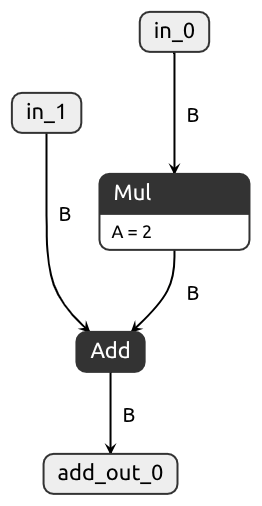
Figure 1: Visualisation of the simple_add.onnx file using Netron.
Inference
Now that we have the .onnx file sitting outside the Python ecosystem, let’s actually run it and prove it works independently of JAX. We will use the C API. For other languages, please refer to the documentation.
Note: It is possible to export other ML library computations, such as PyTorch, to ONNX. Thus, the inference section below should also be possible with ONNX artifacts exported in other ways.
The main.c contains three different execution paths: for CPUs, for AMD GPUs, and for NVIDIA GPUs.
These execution paths share a lot of code. We follow the natural flow of the example and discuss the differences in the pathways. In the main.c file, the execution paths are separated by pre-processor macros (i.e., #ifdef rocm etc.). Please note that in this how-to guide, we omit some details such as return value checking.
Let’s jump right into the initial boilerplate code setup, as can be seen in Listing 2.
const OrtApi* g_ort = OrtGetApiBase()->GetApi(ORT_API_VERSION);

// find available providers
char** providers = NULL;
int num_providers = 0;

OrtStatus* status = g_ort->GetAvailableProviders(&providers, &num_providers);

// Print the providers
printf("Available execution providers (%d):\n", num_providers);
for (int i = 0; i < num_providers; i++) {
    printf("  [%d]: %s\n", i, providers[i]);
}

// start ort env
OrtEnv* ort_env = NULL;
status = g_ort->CreateEnv(ORT_LOGGING_LEVEL_WARNING, "test_inference", &ort_env);

// Create session
OrtSessionOptions* session_options = NULL;
status = g_ort->CreateSessionOptions(&session_options);
status = g_ort->SetIntraOpNumThreads(session_options, 4);
status = g_ort->SetSessionGraphOptimizationLevel(session_options, ORT_ENABLE_ALL);
Listing 2: Boiler plate code for ONNX API.
We start by getting the API. Then, we get and print the available providers to ensure that the providers are available for the accelerator. For AMD GPUs, this is the MIGraphX provider, for NVIDIA GPUs, the TensorRT and CUDA providers. This is followed by creating the environment, which includes setting the logging level. The ORT_LOGGING_LEVEL_VERBOSE level is useful to debug potential issues. At the end, we create the object for the session options and set these two session options. These two session options are just examples, readers should experiment with SetIntraOpNumThreads and SetSessionGraphOptimizationLevel in their own programs and hardware. These settings can have a significant impact on performance. Additionally, note that, if the ONNX Runtime is built with OpenMP,
you should use the OpenMP environment variables. You can find further information on the SetSessionGraphOptimizationLevel in the ONNX Runtime documentation.
By default, the ONNX Runtime executes inference on the CPU. While CPU inference can be useful for testing, HPC workloads often run on accelerators. Thus, we need to enable GPU execution.
For this, we need to add the backend for either the AMD or NVIDIA GPUs, as seen in Listing 3.
const char* desired_provider = "MIGraphXExecutionProvider";
bool provider_available = false;

for (int i = 0; i < num_providers; i++) {
    if (strcmp(providers[i], desired_provider) == 0) {
        provider_available = true;
        break;
    }
}

if (provider_available) {
    OrtMIGraphXProviderOptions migraphx_options={0,0....};
    g_ort->SessionOptionsAppendExecutionProvider_MIGraphX(session_options, &migraphx_options);
}
Listing 3: Adding AMD Execution Providers.
Listing 3 showcases how to add AMD’s MIGraphX provider. First, we check if the provider is available (Lines 1-9). Then, we create the struct (object) that contains the options for the MIGraphX provider.
For this example we use the default options. We append the migraphx_options to the session_options created in the previous code block (Lines 11 to 14). The NVIDIA execution providers (TensorRT and CUDA) can be added with a similar routine. The execution provider options have proper constructors, updating an option has to be done via a function (e.g., UpdateTensorRTProviderOptions). You can find an example for both NVIDIA providers on the EPICURE gitlab.
Note that each execution provider requires corresponding backend installations (i.e., ROCm for MIGraphX, cuDNN/cuBLAS/TensorRT for CUDA paths). Check the execution provider documentation for hardware-specific requirements. There are additional execution providers for Intel GPUs, Apple, Qualcomm, and Android that we haven’t tested for this how-to guide.
After creating the session options, we can then create the specific session, as can be seen in Listing 4.
OrtSession* session = NULL;
const char* model_path = "../simple_add.onnx";
g_ort->CreateSession(ort_env, model_path, session_options, &session);
Listing 4: Loading the onnx model and creating the ORT session.
The model_path references the simple_add.onnx model that we created in the Conversion section.
Now that we have the ORT session, we need some input that we can feed to our model, as shown in Listing 5.
First, we need to define some metadata. Specifically, the names of the inputs and outputs as well as the number of inputs and outputs. The output name add_out_0 and input names in_0 and in_1 match the names appearing in the graph generated by Netron. In practice, you can query these names programmatically through the ONNX Runtime API rather than relying on visual inspection. After loading the model via g_ort->CreateSession you can get the input names via SessionGetInputName(session...), the output names via the SessionGetOutputName function.
 // Input/output metadata
const char* input_names[] = {"in_0", "in_1"};
const char* output_names[] = {"add_out_0"};
const size_t input_count = 2;
const size_t output_count = 1;
int64_t shape[] = {4};

// create input array
float a[] = {1.0,2.0,3.0,4.0};
float b[] = {5.0,6.0,7.0,8.0};
// output array
float c[4] = {0.0, 0.0, 0.0, 0.0};
Listing 5: Creating the input and IO metadata required for an ONNX inference.
After the metadata we create two input arrays and one output array (a, b and c).
Up until now, the code for targeting the CPU and GPU was mostly the same, besides having to add the GPU execution providers. However, now the execution paths diverge. Let’s start with the CPU execution path in Listing 6.
The first step is to create a OrtMemoryInfo, which defines where memory should be allocated using the specified allocator (i.e., OrtArenaAllocator). The OrtArenaAllocator allocates a pool of reusable memory. This is in contrast to the OrtDeviceAllocator, which requests data as needed and frees it instead of returning it to the pool. Overall, the OrtArenaAllocator has less overhead but higher overall memory usage. Next, we create two OrtValue* “tensors” which essentially function as Ort wrappers that point to the users’ underlying data buffers (i.e., arrays a, b and c). These wrappers are populated using the CreateTensorWithDataAsOrtValue (lines 7-14). Note that this is a zero-copy operation. The resulting OrtValue provides a pointer to the original data buffer as well as some metadata about the data location (CPU, GPU, etc.), size, and more. ORT will handle the CPU-to-GPU data transfer automatically in the background, the inputs and outputs are moved to the correct device.
OrtMemoryInfo* mem_info = NULL;
    status = g_ort->CreateMemoryInfo("Cpu", OrtArenaAllocator, 0, OrtMemTypeDefault, &mem_info);

OrtValue* inputs[2] = {NULL, NULL};
OrtValue* outputs[1] = {NULL};

// Create input tensors
status = g_ort->CreateTensorWithDataAsOrtValue(
    mem_info, (void*)a, sizeof(a), shape, 1,
    ONNX_TENSOR_ELEMENT_DATA_TYPE_FLOAT, &inputs[0]);

status = g_ort->CreateTensorWithDataAsOrtValue(
    mem_info, (void*)b, sizeof(b), shape, 1,
    ONNX_TENSOR_ELEMENT_DATA_TYPE_FLOAT, &inputs[1]);

// Run inference
status = g_ort->Run(session, NULL, input_names,
                    (const OrtValue* const*)inputs, input_count,
                    output_names, output_count,
                    outputs);

// Get output data
void* output_ptr = NULL;
status = g_ort->GetTensorMutableData(outputs[0], &output_ptr);
memcpy(c, output_ptr, sizeof(c));
Listing 6: Running ONNX inference on the CPU.
After creating our inputs, we can start the inference with Run. To call Run, we need some of the previously defined metadata around the model’s inputs and outputs. Note that in this case, we are not using the output OrtValue as a wrapper to the previously created c array. Instead, we are passing a nullpointer OrtValue to the Run command. ORT will then allocate the memory itself and set the outputs pointer.
This means we then have to get the pointer to the raw data (GetTensorMutableData) and copy the data back to our c array. Alternatively, we can also use the CreateTensorWithDataAsOrtValue(c...) array approach result in the correct output stored in c.
To execute the inference on the GPU we could simply add an execution provider as shown in Listing 3.
This results in ORT automatically copying the input data to the GPU and running the inference. The ONNX runtime documentation (IO-binding, API) states that ORT assumes the output tensors are requested by the CPU, if the output has not been pre-allocated. Therefore, both the nullpointer + memcpy approach and the CreateTensorWithDataAsOrtValue(...) array approach result in the correct output stored in c.
However, even better than GPU-accelerated inference is avoiding device transfers altogether. When integrating an ML model into an existing HPC pipeline, parts of the pipeline may already be implemented on the GPU. This can be custom HIP or CUDA kernels for processing fluid dynamics, particle physics, or electromagnetic field calculations. Therefore, the data for the ML models can already reside on the GPU. Furthermore, the output of the ML model might be processed further on the GPU. However, by default, ONNX Runtime will copy the data back to the CPU at the end of the run() function call.
Moving data between devices represents significant overhead and presents a non-trivial bottleneck.
Thus, it is better to launch ONNX inference from the existing GPU arrays in a zero-copy manner.
These GPU arrays may take different forms. Here, we explore the use of HIP and CUDA arrays.
In this standalone example, we create tensors/arrays and demonstrate how to pass them along to the ONNX Runtime. The GPU array creation is shown in Listing 7, which is standard HIP/CUDA memory allocation and memory copy.
float *d_array_a = NULL;
float *d_array_b = NULL;
float *d_array_c = NULL;

// Allocate device memory
hipMalloc((void**)&d_array_a, shape[0] * sizeof(float));
hipMalloc((void**)&d_array_b, shape[0] * sizeof(float));
hipMalloc((void**)&d_array_c, shape[0] * sizeof(float));

// Copy data from host to device
hipMemcpy(d_array_a, a, shape[0] * sizeof(float), hipMemcpyHostToDevice);
hipMemcpy(d_array_b, b, shape[0] * sizeof(float), hipMemcpyHostToDevice);
Listing 7: Allocating GPU arrays used as inputs for the ONNX inference.
The core mechanism for using existing GPU buffers is IO binding in ONNX Runtime. This allows us to point ONNX to existing input and output buffers without copying. This is demonstrated in Listing 8.
Furthermore, it enables instructing ONNX to allocate outputs directly on-device. This is useful when outputs vary in size or shape. Further information on IO binding can be found on the ONNX runtime documentation about IO-binding and API.
Similar to the CPU example, we start by creating a MemoryInfo. However, we are using the newer API call CreateMemoryInfo_V2 which requires additional information such as the vendor_ID. The CreateMemoryInfo API call seems to have a bug where for AMD GPUs, the vendor ID is not reported correctly, ORT will crash due to the mismatch. In the CreateMemoryInfo_V2 call, we can specify the Vendor_ID explicitly (4098 for AMD and 4318 for NVIDIA). The EPICURE gitlab contains the full example.
After creating the MemoryInfo, we wrap the already allocated input and output arrays with CreateTensorWithDataAsOrtValue.
OrtMemoryInfo* mem_info = NULL;
status = g_ort->CreateMemoryInfo_V2("GPU", OrtMemoryInfoDeviceType_GPU, vendor_ID, 0, OrtDeviceMemoryType_DEFAULT, 0, OrtArenaAllocator, &mem_info);

// Create input tensors
status = g_ort->CreateTensorWithDataAsOrtValue(
    mem_info, (void*)d_array_a, shape[0] * sizeof(float), shape, 1,
    ONNX_TENSOR_ELEMENT_DATA_TYPE_FLOAT, &inputs[0]);

status = g_ort->CreateTensorWithDataAsOrtValue(
    mem_info, (void*)d_array_b, shape[0] * sizeof(float), shape, 1,
    ONNX_TENSOR_ELEMENT_DATA_TYPE_FLOAT, &inputs[1]);

// Create outout tensors
status = g_ort->CreateTensorWithDataAsOrtValue(
    mem_info, (void*)d_array_c, shape[0] * sizeof(float), shape, 1,
    ONNX_TENSOR_ELEMENT_DATA_TYPE_FLOAT, &outputs[0]);

// Create binding
OrtIoBinding * binding=NULL;
status = g_ort->CreateIoBinding(session, &binding);

// Bind input and output
status=g_ort->BindInput(binding, input_names[0], inputs[0]);
status=g_ort->BindInput(binding, input_names[1], inputs[1]);
status=g_ort->BindOutput(binding, output_names[0], outputs[0]);


// Run inference
status = g_ort->RunWithBinding(session, NULL, binding);
hipMemcpy(c, d_array_c, shape[0] * sizeof(float), hipMemcpyDeviceToHost);
Listing 8: Launching an ONNX Runtime inference with GPU IO-binding as input.
After creating the wrappers, we create the OrtIoBinding and bind the OrtValues to the input and output names. To start the inference, we call the RunWithBinding function instead of the Run function. At last, we copy the memory back to the CPU. Note that in production code, you skip the copy-back step, the GPU processing continues downstream.
Finally, Listing 9 shows the freeing of our GPU DeviceArrays as well as the ORT objects.
g_ort->ReleaseValue(inputs[0]);
g_ort->ReleaseValue(inputs[1]);
g_ort->ReleaseValue(outputs[0]);
g_ort->ReleaseMemoryInfo(mem_info);
g_ort->ReleaseSession(session);
hipFree(d_array_a);
hipFree(d_array_b);
hipFree(d_array_c);
Listing 9: Variable cleanup.
Note: Listing 9 does not show the full extent of the memory freeing. For that please refer to the EPICURE gitlab. Furthermore, in the gitlab code you will notice that the g_ort->ReleaseEnv(ort_env); function is commented out. This is because the call causes segfaults on AMD GPUs after the return of the main function. This is caused by the function unloading the MIGraphX components, which seems to trigger the unloading of the ROCm library chain. However, parts of the chain are needed to tear down thread local GPU data upon thread exist.
Discussion
Earlier, we worried about pulling Python into our HPC stack. What we showed here sidesteps that entire problem. Once you export your JAX computation to ONNX, the Python runtime disappears from your critical inference path. You can furthermore use IO-binding to keep data resident on the GPU to optimize data transfer bottlenecks. You’re left with a portable model artifact, regardless of whether your surrounding pipeline uses C++, Fortran or CUDA directly. However, this approach also introduces complexity and possible shortcomings worth considering.
- Pipeline Composition Your ML pipeline may not be a simple ML model. For example, it is possible to do Monte Carlo simulation for Financial Option Pricing with JAX. It would also be possible to export this simulation as a forward pass to ONNX. However, if you also want to compute the derivatives, you either have to explore finite difference methods or investigate if the ORT Training API offers enough functionality to auto-differentiate the simulation. You may find that ONNX has other similar limitations that mean that you cannot just export your model to the ONNX format.
- Speedup Reality Check Performance improvements stem from two potential factors:
- Reduced IO overhead ONNX eliminates some of the IO overhead that pure JAX introduces. However, depending on the severity of the IO overhead, it might be worth investigating JAX optimizations first.
- Compilation ONNX offers upfront optimization of the computational graph, whereas JAX relies on just-in-time compilation.
This distinction matters primarily if model dimensions change frequently during inference.
Dynamic batch sizes or grid dimensions trigger repeated JAX compilations that can add substantial latency compared to pre-optimized ONNX graphs.
- Long-Term Maintenance Every model change and retrain cycle requires re-exporting to ONNX.
Versioning becomes a challenge, you have to track three paths: the JAX source code, the ONNX serialized artifacts, and the low-level implementation. A mismatch at any point can produce silent failures or numerical divergence downstream. Establishing clear version-tagging conventions linking ONNX releases to training checkpoints and inference binary builds is essential. - Python examples If you prefer a
Pythonbased inference example, you can look at the full example on the EPICURE gitlab in theONNX_Inference_Pythondirectory. Here, you will find examples of usingTorchTensors,HIParrays andCUDAarrays in combination with IOBind as inputs to ORT.
Conclusion
In conclusion, converting JAX to ONNX removes Python runtime barriers while preserving ML acceleration benefits. The payoff comes in deployment simplicity, cross-language portability, output buffer management, and potentially reduced latency through optimized static graphs. But it demands careful attention to pipeline architecture, version coordination, and training cadence. For stable inference workloads, the trade-offs may be worth it. For rapidly evolving models requiring frequent adaptation, the developer needs to weigh these constraints against alternative integration strategies such as PJRT or hybrid approaches mixing native JAX and ONNX components.