Case study: Placement pingpong
Author: Bert Jorissen (UAntwerpen)
Using a GPU node: correct placement of tasks
Modern HPC codes often rely on accelerators (GPUs) to speed up computations. On HPC systems, these accelerators are grouped in specific nodes. Often, these GPU nodes contain multiple GPUs to enable multi-GPU jobs within a single node.
The CPUs in these GPU nodes have multiple cores and multiple NUMA domains. These NUMA domains split the CPU into multiple parts, each part having its own memory.
Running multiple GPUs on one node reduces the need for inter-node communication (which is often slower) but requires attention to CPU topology and NUMA placement to avoid unnecessary cross-domain traffic and bandwidth bottlenecks.
Here, we show why the correct CPU-GPU placement matters and provide examples how to bind tasks to the CPUs and GPUs. The measurements and examples are taken from tests on LUMI-G and on Leonardo Booster. They illustrate the effect of CPU-GPU binding on host-device bandwidth and on total runtime. These results are specific to the hardware used for the tests and should not be blindly compared across different systems. We do not endorse one system or vendor over another.
LUMI-G
On LUMI-G, each node has 4 AMD GPUs connected to 4 NUMA domains. The figure below shows the connection between the GPUs and the NUMA domains on LUMI-G:
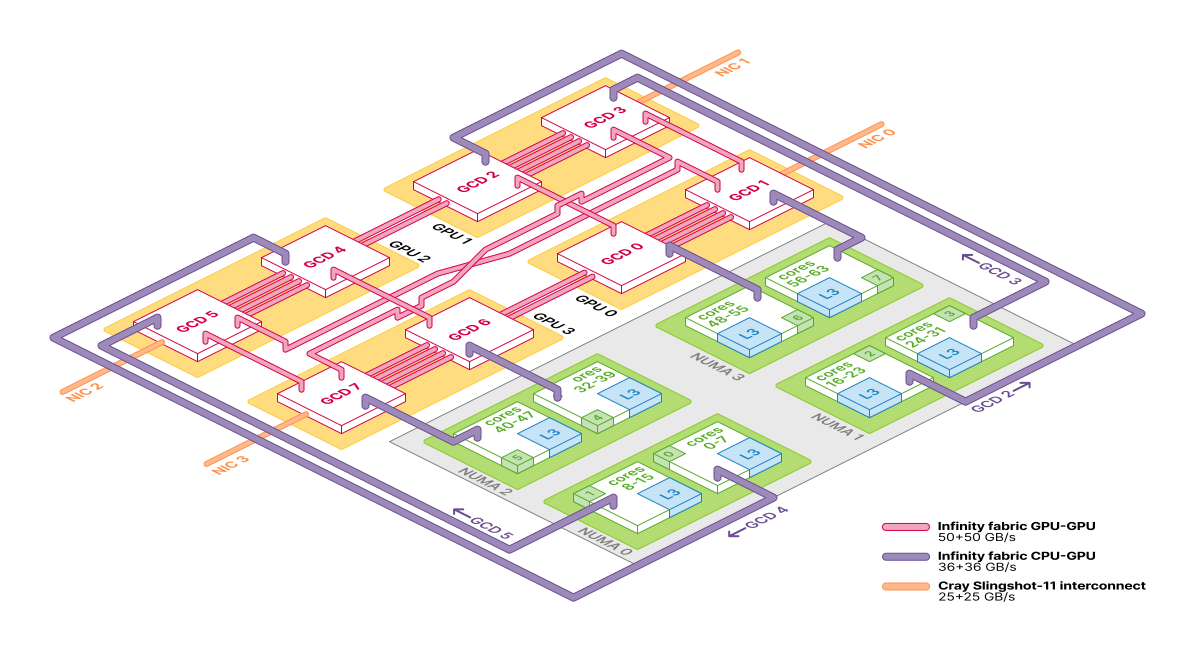
Overview of a LUMI-G compute node, © LUMI 2025
As you can see, each GPU is connected to a specific NUMA domain. On the figure, the orange package is one MI250X GPU with two GCD chips. As each GCD is working independently, we will treat them as separate GPUs.
Test Program
By binding the correct CPU to the GPU, you can gain performance on your code. We will investigate this behaviour with a small test program. In the test program below, an array is transferred to and from the GPU to the RAM.
The code is written in C++ and uses the HIP or CUDA API to perform the GPU transfers. HIP is the AMD equivalent of CUDA, which also works on NVIDIA GPUs.
The code can be found in the opencode.it4i.eu repository. Below, a simplified version of the code is shown.
#include <hip/hip_runtime.h>
#include <iostream>

int main(int argc, char** argv) {
    int message_size = 50 * 1024 * 1024; // 200 MB - 50 Mi floats * 4 bytes
    int repeats = 1000; // Number of data transfers

    // Allocate host and device arrays
    float* host_array;
    float* device_array;
    host_array = (float*)malloc(message_size * sizeof(float));
    hipMalloc((void**)&device_array, message_size * sizeof(float));
    for (int i = 0; i < 500000; i++) {
        host_array[i] = static_cast<float>(i);
    }

    // Perform data transfers and time them
    for (int i = 0; i < repeats; i++) {
        hipMemcpy(device_array, host_array, message_size * sizeof(float), hipMemcpyHostToDevice);
        hipMemcpy(host_array, device_array, message_size * sizeof(float), hipMemcpyDeviceToHost);
    }

    // Free memory
    hipFree(device_array);
    free(host_array);
    return 0;
}
This code is further extended to work with MPI, where each tasks times the different data transfers. There is also an option to print additional information about the GPUs accessible to the program. We are mainly interested in the bandwidth of the data transfers. We repeat the transfers several times and calculate the average time taken for the transfers and the bandwidth achieved.
Executing the program
The program is started with the srun command on LUMI-G. The program tests the transfers of data from RAM (CPU) memory to GPU memory and back. We thus have three components that can influence the performance:
- the CPU where the data is located,
- the GPU where the data is transferred to,
- the NUMA domain where the data transfer originates from.
Each option can be set using specific binding options in the srun or other commands. Usually, the memory is allocated close to the CPU where the task is running by default, in the same NUMA domain.
srun provide several options to bind tasks to specific CPUs. Both specific CPUs can be chosen and a mask of the different CPUs in the system. Here, we will always bind specific CPUs to the tasks, as this gives the most control over the placement. In hybrid MPI+OpenMP codes, it is better to bind a set of CPUs to each MPI rank.
The specific placement of the CPUs on a machine can be investigated with the hwloc-ls command. It is good practice to investigate this before running the program to understand the CPU layout.
On LUMI-G, each node has 4 NUMA domains, each with 16 CPU cores. Furthermore, each NUMA domain is devided in two sets of 8 cores which share the L3 cache. On these L3-cached cores, one GPU is connected. One NUMA domain is connected to one of the MI250X, which contains two GPUs.
We bind a specific CPU to a task with the --cpu-bind option of srun and only allocate one core per task. The GPUs are chosen using the ROCM_VISIBLE_DEVICES environment variable. The ROCM name comes from the AMD ROCm software stack for GPUs, equivalent to NVIDIA’s CUDA.
This environment variable is set in a small wrapper script that is called before the actual program is started. This scripts allows us to vary the environment variable based on the different tasks
# set the CPU and GPU maps
cpu="49,57,17,25,1,9,33,41"
gpu="0,1,2,3,4,5,6,7"
# generate the GPU selection-script
cat << EOF > select_gpu
#!/bin/bash
GPU_LOC=(${gpu//,/ }) # convert the comma-separated list to a bash-array
export ROCM_VISIBLE_DEVICES=\${GPU_LOC[\$SLURM_LOCALID]} # bind each task to a specific GPU
exec \$*
EOF
# make the selection-script an executable
chmod +x select_gpu
# bind the right cores with "cpu_bind" and call the GPU-placement script first
srun -n $n_tasks --cpu-bind="map_cpu:$cpu" ./select_gpu ./pingpong
The script first copies the gpu variable into a local array it stores in the script. Then, based on the local task ID (SLURM_LOCALID), it sets the ROCM_VISIBLE_DEVICES variable to the correct GPU for that task. Finally, it executes the actual program. For CUDA programs on NVIDIA GPUs, the same can be done with the CUDA_VISIBLE_DEVICES variable.
Running the tests
We run the program with different combinations of CPU and GPU bindings.
Single task
The examples below will always run on an empty (exclusive) node on LUMI-G. We start with a single task (1 MPI rank) and 1 GPU to measure the maximum performance of the CPU-GPU transfers.
Placement on an empty node
When we run with a single task, we can bind a specific CPU to a GPU, we set for example
cpu="49"
gpu="0"
which outputs:
----------------------------------
- Check Placement
- ++++++++++++++++++++++++++++++ -
- GPU 0
- CPU 49
- SIZE 33554432
----------------------------------

//////////////////////////////////
// PING PONG // EPICURE // HIP ///
//////////////////////////////////

++++++++++++++++++++++++++++++++++
+ SETTINGS
+  SIZE:           33554432      +
+  REPS:                100      +
+  WARM:                 10      +
+  POST:                  1      +
+  INFO:                  1      +
+ DATA                           +
+  TRANSFERING FLOATS OF SIZE 4  +
+   >    134217728.000 Bytes     +
+   >       131072.000 KibiBytes +
+   >          128.000 MebiBytes +
+   >            0.125 GibiBytes +
++++++++++++++++++++++++++++++++++

==================================
[Rank 0] (Visible Devices: 1)
  [Device 0]
    Name:     AMD Instinct MI250X
    PCI Address:         0:c1:0
==================================

Elapsed times per rank:
[Rank 0]--------------------------
 Full Transfer:
        mean:   10.65665 ms
         std:    0.00155 ms
         min:   10.65522 ms
         max:   10.66125 ms
   bandwidth:   23.45952 GB/s
 Host to Device:
        mean:    5.30856 ms
         std:    0.00123 ms
         min:    5.30735 ms
         max:    5.31162 ms
   bandwidth:   23.54687 GB/s
 Device to Host:
        mean:    5.34809 ms
         std:    0.00045 ms
         min:    5.34747 ms
         max:    5.34975 ms
   bandwidth:   23.37281 GB/s

//////////////////////////////////
Total program time:    1.63923 sec
//////////////////////////////////
The copy from host to device seems to be a slightly faster than the copy from device to host, but the difference is minimal. The maximum bandwidth we achieve is roughly 23.5 GiB/s, which is lower than the theoretical maximum of the Infinity Fabric (36 GB/s). We are likely limited by the read speed of the CPU from RAM.
when we set a different GPU, i.e. "4", we get as output:
 Full Transfer:
        mean:   10.65981 ms
         std:    0.00050 ms
         min:   10.65885 ms
         max:   10.66202 ms
   bandwidth:   23.45257 GB/s
which is a bit slower, but within the margin of error.
Indeed, the performance is the same for both GPUs. As you can see in the figure below, there does not seem to be a difference in the connection of the GPUs to the NUMA domains on LUMI-G.
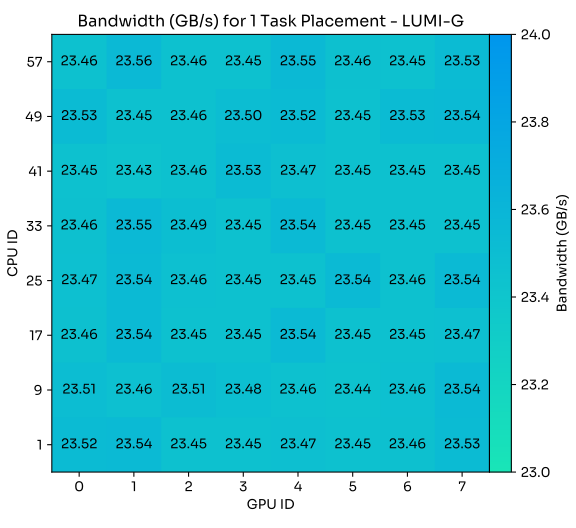
Bandwidth for different CPU-GPU combinations on an exclusive node, © EPICURE 2025.
Of course, in a real workload with multiple tasks, the placement will matter more as multiple tasks will compete for the same resources.
Bandwidth and message size
We can also investigate the influence of the size of the data transfers. Let’s first try a smaller data transfer, and start with 1 float (4 B) which gives as output:
 Full Transfer:
        mean:    0.01424 ms
         std:    0.00102 ms
         min:    0.01227 ms
         max:    0.02086 ms
   bandwidth:    0.00052 GB/s
This is very slow compared to the larger data transfers from above.
We can also look at 64 kiB, which gives as output:
 Full Transfer:
        mean:    0.02300 ms
         std:    0.00036 ms
         min:    0.02233 ms
         max:    0.02382 ms
   bandwidth:    5.30840 GB/s
and to the output of 128 kiB:
 Full Transfer:
        mean:    0.07108 ms
         std:    0.00349 ms
         min:    0.06867 ms
         max:    0.08942 ms
   bandwidth:    3.43477 GB/s
The performance for the 64 kiB is much better than for 1 float, but still much worse than for the large transfers of 128 MiB from previous section. For smaller data transfers, the overhead of starting the transfer dominates the total time.
However, when we look at 128 kiB, the performance goes down again. This is likely due to some internal caching mechanism in the GPU or the CPU.
For larger data transfers, up to a full GPU ~64 GiB, the performance remains roughly the same as for the 128 MiB transfer (output for 32 GiB):
 Full Transfer:
        mean: 2724.69147 ms
         std:    0.02552 ms
         min: 2724.64716 ms
         max: 2724.85842 ms
   bandwidth:   23.48890 GB/s
This maximum performance is probably the limit of the read spead of the CPU from RAM.
We can summarize this in a single figure:
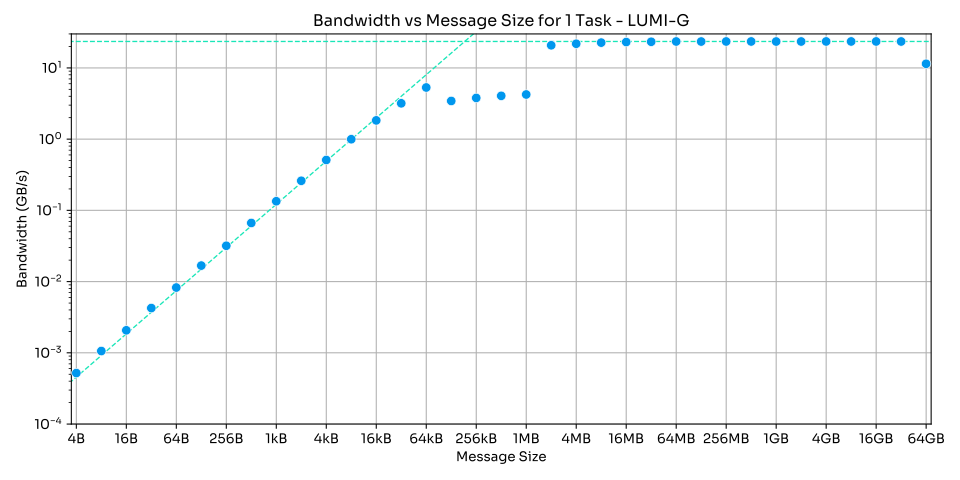
Bandwidth for different message sizes, © EPICURE 2025.
As this figure has a sharp slope and then a flat line, the figure is similar to a roofline plot. First, the performance increases with increasing data size, until it reaches a maximum performance. After that, the performance remains roughly constant. At 64 GiB, there is a drop as we fill up the GPU memory and the GPU probably has to manage its memory more actively.
Multiple tasks
When we run with multiple tasks, we can bind specific CPUs to specific GPUs.
Correct placement
We start with the correct placement of the GPUs and the CPUs according to the figure at the start of this document. For this, we will bind task 0 to GPU 0 and CPU 49, task 1 to GPU 1 and CPU 57, … :
----------------------------------
- Correct Placement
- ++++++++++++++++++++++++++++++ -
- GPU 0,1,2,3,4,5,6,7
- CPU 49,57,17,25,1,9,33,41
- SIZE 67108864
----------------------------------
When we run the program with this setup, we get the following output:
Elapsed times per rank:
[Rank 0]--------------------------
 Full Transfer:
        mean:   28.37514 ms
         std:    3.49444 ms
         min:   21.79861 ms
         max:   41.58415 ms
   bandwidth:   17.62106 GB/s      [...]
[Rank 1]--------------------------
 Full Transfer:
        mean:   28.03862 ms
         std:    2.64210 ms
         min:   23.06436 ms
         max:   34.62048 ms
   bandwidth:   17.83255 GB/s      [...]
[Rank 2]--------------------------
 Full Transfer:
        mean:   27.26915 ms
         std:    2.75464 ms
         min:   21.56006 ms
         max:   34.03537 ms
   bandwidth:   18.33574 GB/s      [...]
[Rank 3]--------------------------
 Full Transfer:
        mean:   28.45257 ms
         std:    3.35085 ms
         min:   22.39304 ms
         max:   38.32263 ms
   bandwidth:   17.57311 GB/s      [...]
[Rank 4]--------------------------
 Full Transfer:
        mean:   30.58955 ms
         std:    0.90828 ms
         min:   27.17812 ms
         max:   31.42603 ms
   bandwidth:   16.34545 GB/s      [...]
[Rank 5]--------------------------
 Full Transfer:
        mean:   30.63158 ms
         std:    1.37599 ms
         min:   26.13716 ms
         max:   32.53253 ms
   bandwidth:   16.32302 GB/s      [...]
[Rank 6]--------------------------
 Full Transfer:
        mean:   30.57258 ms
         std:    1.50466 ms
         min:   26.30613 ms
         max:   32.54328 ms
   bandwidth:   16.35452 GB/s      [...]
[Rank 7]--------------------------
 Full Transfer:
        mean:   30.61326 ms
         std:    2.45280 ms
         min:   22.09821 ms
         max:   35.88030 ms
   bandwidth:   16.33279 GB/s      [...]

//////////////////////////////////
Total program time:   16.24633 sec
//////////////////////////////////
The performance is lower than in the single task case, but still acceptable. Notice that there are some variations in execution time for each task, sometimes the transfer is much slower. This is likely due to saturation of the data connections in the system being used by other tasks on the node.
Incorrect placement
When we run with an incorrect placement, e.g., binding task 0 to GPU 0 and CPU 1, etc.:
----------------------------------
- Incorrect Placement
- ++++++++++++++++++++++++++++++ -
- GPU 0,1,2,3,4,5,6,7
- CPU 1,9,17,25,33,41,49,57
- SIZE 67108864
----------------------------------
we get the following output:
[Rank 0]--------------------------
 Full Transfer:
        mean:   40.18984 ms
         std:    2.92538 ms
         min:   34.49587 ms
         max:   46.41088 ms
   bandwidth:   12.44095 GB/s      [...]
[Rank 1]--------------------------
 Full Transfer:
        mean:   64.74852 ms
         std:    3.50235 ms
         min:   54.39005 ms
         max:   72.53853 ms
   bandwidth:    7.72218 GB/s      [...]
[Rank 2]--------------------------
 Full Transfer:
        mean:   34.59955 ms
         std:    3.55850 ms
         min:   25.76855 ms
         max:   41.37507 ms
   bandwidth:   14.45105 GB/s      [...]
[Rank 3]--------------------------
 Full Transfer:
        mean:   66.97608 ms
         std:    3.50355 ms
         min:   56.40968 ms
         max:   74.42848 ms
   bandwidth:    7.46535 GB/s      [...]
[Rank 4]--------------------------
 Full Transfer:
        mean:   52.67028 ms
         std:    2.56067 ms
         min:   48.75788 ms
         max:   56.77458 ms
   bandwidth:    9.49302 GB/s      [...]
[Rank 5]--------------------------
 Full Transfer:
        mean:   33.44494 ms
         std:    4.02600 ms
         min:   27.42386 ms
         max:   37.74904 ms
   bandwidth:   14.94994 GB/s      [...]
[Rank 6]--------------------------
 Full Transfer:
        mean:   52.69573 ms
         std:    2.72296 ms
         min:   48.81179 ms
         max:   56.68344 ms
   bandwidth:    9.48844 GB/s      [...]
[Rank 7]--------------------------
 Full Transfer:
        mean:   33.44124 ms
         std:    4.01787 ms
         min:   27.42662 ms
         max:   37.71745 ms
   bandwidth:   14.95160 GB/s      [...]

//////////////////////////////////
Total program time:   26.03712 sec
//////////////////////////////////
The performance is significantly lower than in the correct placement case. The total program time is 10 seconds longer, which is a significant increase. This shows the importance of binding the tasks to the correct CPUs and GPUs.
Half usage
When we run with only half the GPUs being used, we can also bind the tasks to the correct CPUs. We do not encourage using only half the GPUs on a node, as this is a waste of resources. We have the following placements:
- GPU 0,2,4,6
- CPU 49,17,1,33
which gives the following output:
[Rank 0]- [...] bandwidth:   23.44455 GB/s [...]
[Rank 1]- [...] bandwidth:   23.44240 GB/s [...]
[Rank 2]- [...] bandwidth:   23.44236 GB/s [...]
[Rank 3]- [...] bandwidth:   23.44888 GB/s [...]
Total program time:   11.34055 sec
This is similar to the single task case, as there is no competition for resources.
When we run with an incorrect placement:
- GPU 0,2,4,6
- CPU 1,33,49,17
we get the following output:
[Rank 0]- [...] bandwidth:   23.27594 GB/s [...]
[Rank 1]- [...] bandwidth:   20.46180 GB/s [...]
[Rank 2]- [...] bandwidth:   20.51923 GB/s [...]
[Rank 3]- [...] bandwidth:   23.31181 GB/s [...]
Total program time:   12.42984 sec
where we see a small drop in performance for the tasks.
Other tests
We can also perform tests where 1 GPU is used by multiple tasks, or 1 NUMA domain is used by multiple tasks. In these cases, the performance drops significantly as the resources are shared between multiple tasks. The limitations originate primarily from the read speed of the CPU from RAM, or by the bandwidth of the Infinity Fabric between the NUMA domains and the GPUs.
Leonardo Booster
Using the CUDA version, the tests are executed on the Leonardo Booster system at CINECA. Here, each node has 4 NVIDIA A100 GPUs connected to 2 NUMA domains. All the GPUs are connected to the first NUMA domain. However, the distance between the NUMA domains and the GPUs is much closer than on LUMI-G. The 4 GPUs are connected to the first 16 cores of the CPU (NUMA domain 0), the other 16 cores belong to NUMA domain 1.
Placement of 1 task
When we run with a single task on Leonardo Booster, we get the following results. For the correct placement (CPU 0, GPU 0) we obtain the output:
----------------------------------
- Check Placement
- ++++++++++++++++++++++++++++++ -
- GPU 0
- CPU 1
- SIZE 33554432
---------------------------------- [...]
 Full Transfer:                    [...]
   bandwidth:    9.99197 GB/s      [...]
Total program time:    3.12716 sec
For the incorrect placement (CPU 16, GPU 0) we have as output:
----------------------------------
- Check Placement
- ++++++++++++++++++++++++++++++ -
- GPU 0
- CPU 16
- SIZE 33554432
---------------------------------- [...]
 Full Transfer:                    [...]
   bandwidth:    9.68334 GB/s      [...]
Total program time:    3.21515 sec
The performance difference is small, as the distance between the NUMA domains and the GPUs is small.
Again, we can also investigate the influence of the size of the data transfers:
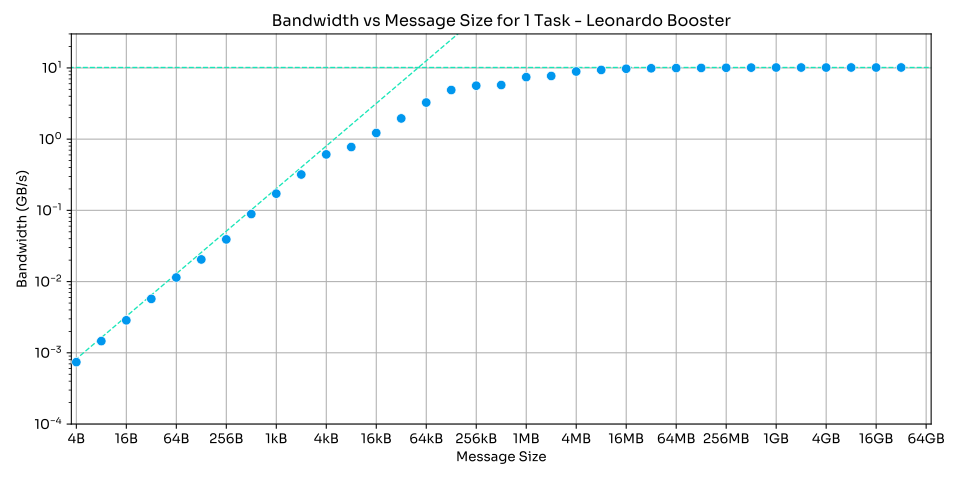
Bandwidth for different message sizes on Leonardo Booster, © EPICURE 2025.
The performance behaviour is similar to LUMI-G.
Placement of multiple tasks
When we run with multiple tasks on Leonardo Booster, we get as output for the correct placement:
- GPU 0,1,2,3
- CPU 1,2,3,4                              [...]
[Rank 0]- [...] bandwidth:    7.41894 GB/s [...]
[Rank 1]- [...] bandwidth:    7.40249 GB/s [...]
[Rank 2]- [...] bandwidth:    7.33413 GB/s [...]
[Rank 3]- [...] bandwidth:    7.43171 GB/s [...]
Total program time:   34.91509 sec
and the output for the incorrect placement:
- GPU 0,1,2,3
- CPU 16,17,18,19                          [...]
[Rank 0]- [...] bandwidth:    7.36100 GB/s [...]
[Rank 1]- [...] bandwidth:    7.51615 GB/s [...]
[Rank 2]- [...] bandwidth:    7.53296 GB/s [...]
[Rank 3]- [...] bandwidth:    7.36176 GB/s [...]
Total program time:   34.65113 sec
Here, the performance difference is negligible, as all GPUs are connected to the same NUMA domain. The close placement does thus not matter significantly on this system.
We can also spread the tasks over both NUMA domains, which gives as output:
- GPU 0,1,2,3
- CPU 1,2,16,17                            [...]
[Rank 0]- [...] bandwidth:    8.99438 GB/s [...]
[Rank 1]- [...] bandwidth:    9.04050 GB/s [...]
[Rank 2]- [...] bandwidth:    9.08353 GB/s [...]
[Rank 3]- [...] bandwidth:    9.22851 GB/s [...]
Total program time:   28.85168 sec
which gives a better result than placing all tasks on the same NUMA domain. This is likely due to better overall memory bandwidth when using both NUMA domains. This shows that even on systems where the GPUs are closely connected to one NUMA domain, it can still be beneficial to spread the tasks over multiple NUMA domains to improve overall memory bandwidth. Of course, this depends on the specific program and workload being used.
Conclusion
When using multiple GPUs on a single node on LUMI-G, it is important to bind the tasks to the correct CPUs. Each program has its own characteristics. To get the most out of your codes, you should first test the performance on the specific hardware you are using.
By binding the tasks to the correct CPUs and GPUs, you can achieve optimal performance for your multi-GPU applications. This performance gain can be significant, especially for large data transfers and computations. It is good practice to bind tasks correctly to avoid potential performance issues in other scenarios.
Furthermore, when writing HPC applications that use GPUs, it is essential to consider the allocation of the memory. Specific tutorials for AMD-HIP and NVIDIA-CUDA are available to help you understand the different memory spaces and how to use them effectively. Here, we showed only a minimal example of host-device transfers, but real applications often have more complex memory access patterns.
Takeaway message: always benchmark your code on the target hardware to ensure optimal performance!
You can find the Git repository related to this article here.