LLM-using-llama
Author: Alícia Oliveira (INESC TEC, Deucalion)
How to run an LLM using llama.cpp on the Deucalion ARM partition
Large Language Models (LLMs) have been increasingly used in a diverse range of environments, with a growing emphasis on inference and on how to make it efficient and scalable. This guide explains how to run Meta Llama 3.1 8B using llama.cpp on the Deucalion ARM partition, highlighting why ARM is an interesting choice for LLM inference.
1) Deucalion and the ARM partition
Deucalion is a supercomputer that features an ARM-based partition, utilizing Fujitsu A64FX ARM (Advanced RISC Machines) processors. This partition is designed to deliver high performance with improved energy efficiency.
ARM partition is particularly used to:
- Inference-focused workloads
- Scientific simulations
- Large-scale data processing
The ARM architecture is based on a reduced instruction set (RISC), which enables a simpler and more efficient design, resulting in lower power consumption and reduced heat generation.
2) The importance of inference
As LLMs are increasingly deployed and used, the quality of inference becomes influenced by factors such as performance, efficiency, and resource utilization.
Optimizing these factors simultaneously is non-trivial. Inference behavior depends on several conditions, including the hardware and software stack, as well as offline and real-time services. As a result, effective LLM inference requires balancing trade-offs between performance and energy consumption.
Thus, the emphasis on inference efficiency highlights the relevance of inference engines such as llama.cpp, combined with energy-efficient architectures like ARM, forming a suitable solution for LLM deployment.
3) Running Llama 3.1 8B on a single ARM node
The following steps demonstrate how to run Meta Llama 3.1 8B using llama.cpp on the Deucalion ARM partition.
3.1 Create an interactive ARM session
srun -p dev-arm -A <account_name> -t 4:00:00 --pty bash3.2 Create a working directory
mkdir llama-models
cd llama-models
3.3 Load the llama.cpp module
module load llama.cpp/20251110-foss-2023a3.4 Download the GGUF model from Hugging Face
huggingface-cli download bartowski/Meta-Llama-3.1-8B-Instruct-GGUF \
  --include "*Q4_K_M*.gguf" \
  --local-dir ./models/llama3.1-8b \
  --local-dir-use-symlinks False
Note:
If the download fails, ensure thathuggingface-cliis available on the system and that you are logged in (huggingface-cli login).
Access to Meta Llama models may require accepting the corresponding license on Hugging Face.
3.5 Run the model
You can run Meta Llama 3.1 8B either in an interactive terminal session or by exposing it through an HTTP server for browser-based interaction.
3.5.1 Interactive CLI
llama-cli -m models/llama3.1-8b/Meta-Llama-3.1-8B-Instruct-Q4_K_M.ggufAfter loading, the model starts an interactive inference session directly in the terminal, allowing you to input prompts and receive responses in real time.
3.5.2 Using an HTTP server
Alternatively, llama.cpp provides a built-in HTTP server that exposes the model through a web interface.
Start the server on the compute node:
llama-server -m models/llama3.1-8b/Meta-Llama-3.1-8B-Instruct-Q4_K_M.gguf \
  --host 0.0.0.0 \
  --port 8080
This launches the model as a service listening on port 8080.
From a local machine, create an SSH tunnel to forward the port from the compute node:
ssh <your_username>@login.deucalion.macc.fccn.pt -L 8080:<compute_node>:8080Replace <your_username> with your Deucalion username and <compute_node> with the allocated ARM compute node (for example, cna0001).
Once the tunnel is active, open a web browser and navigate to:
http://localhost:8080You will be able to interact with the model through the browser-based interface.
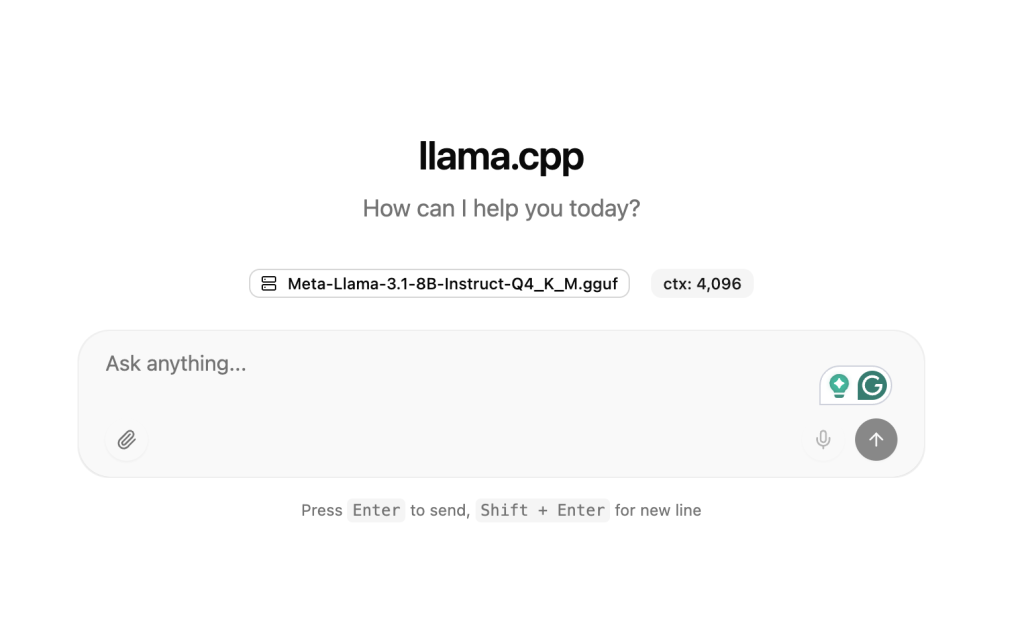
Figure: Web interface served by llama-server, allowing interactive inference through a browser.
In addition to llama-cli and llama-server, llama.cpp also provides other tools such as llama-bench and llama-perplexity. A complete overview of all available tools and capabilities can be found in the llama.cpp documentation: https://github.com/ggml-org/llama.cpp/blob/master/README.md
Conclusion
Combining llama.cpp with ARM-based partitions provides an effective and energy-efficient approach for LLM inference.
As inference becomes the dominant AI workload, architectures that balance strong performance with lower energy impact can be a valuable option, particularly for smaller AI models.